7 Steps to Integrate Digital Health Into Hospital Workflows
Integrate digital health hospital workflows with our proven 7-step framework. Reduce adoption friction and get clinicians on board faster. Learn how.

Last Updated: October 25, 2026
Quick Summary
To integrate digital health hospital workflows, start by mapping your current clinical processes to identify inefficiencies, then design EHR integration with interoperability standards that allow systems to exchange data automatically. Success requires clinician involvement from the start, a phased rollout approach, and ongoing measurement of clinical outcomes and adoption metrics.
- Map current workflows first by interviewing clinicians to identify pain points like duplicate data entry and scheduling delays.
- Design integration around interoperability standards like HL7 or FHIR so data flows automatically between systems without manual entry.
- Identify clinical champions early to drive adoption from inside the organization and influence peer acceptance.
- Start with a pilot in one unit or workflow before rolling out hospital-wide to catch problems affecting dozens rather than thousands.
- Track clinical outcomes like appointment no-show rates and medication errors, not just system uptime or login frequency.
Step 1: Assess Your Current Clinical Workflow and Identify Inefficiencies
To integrate digital health hospital workflows, you must start by understanding what you actually have. Most hospitals skip this step and jump straight to buying software. That’s backwards. You need to map your current clinical workflow first, identify where staff spend time on manual tasks, and spot the bottlenecks that slow down patient care.
Start by interviewing clinicians directly. Ask them where they waste the most time. Ask nurses, doctors, and administrative staff separately, they’ll give you different answers. Common pain points include duplicate data entry between systems, waiting for test results, scheduling delays, and manual appointment reminders.
Document the current process step-by-step. How long does it take a patient to move from registration to seeing a clinician? Where do handoffs happen between departments? Which tasks require paper or phone calls instead of digital tools?
Here’s what to track:
- Time spent on manual data entry per clinician per day
- Number of systems staff log into to complete one task
- Appointment no-show rates and cancellation reasons
- Average time from order placement to result availability
- Staff overtime or burnout signals related to workflow friction
Hospital Stakeholder Mapping That Drives Adoption helps you identify which decision-makers influence workflow changes. Understanding who drives adoption decisions matters as much as understanding the workflow itself.
The goal isn’t perfection, it’s clarity. You need a baseline of what’s broken so you can measure improvement after digital health implementation.
Step 2: Map Workflow Mapping in Healthcare to Pinpoint Integration Points
Workflow mapping in healthcare is the process of documenting every step clinicians take to complete a task, from patient check-in to discharge, so you can see exactly where digital health tools should fit.
Most hospitals have workflows that evolved over decades. They’re inefficient but familiar. When you map them visually, the integration points become obvious. You’ll see where a single digital tool can eliminate three manual steps.
Create a visual flowchart for each major clinical process. Include:
- Who performs each step
- What tools or systems they use
- How long it takes
- Where delays happen
- Where data moves between systems
Use swimlane diagrams if you have multiple departments involved. Horizontal lines represent each department. Vertical flows show handoffs between teams.
Focus on high-volume processes first. Appointment scheduling, patient intake, medication administration, and discharge planning affect more staff and patients than specialty workflows. Fix the high-impact areas before optimizing edge cases.
Pay attention to where clinicians switch between systems. If a nurse logs into the EHR, then a separate system for medication management, then back to the EHR, that’s a friction point. Digital health tools should consolidate these steps, not add more systems.
Document current pain points alongside the workflow. “Nurses spend 12 minutes per patient manually entering vital signs into two separate systems” is specific and measurable. “The system is slow” is not.
Step 3: Design EHR Workflow Integration With Interoperability in Mind
EHR workflow integration means connecting your electronic health record system with other digital health tools so data flows automatically instead of requiring manual entry.
Using Health IT to Support Improvements in Clinical Workflow: A National Web Conference
AHRQ Digital Healthcare Research
Here’s the reality: most hospitals have multiple systems that don’t talk to each other. Your EHR doesn’t connect to your lab system, your imaging system, or your pharmacy system.
When you design integration, prioritize interoperability from the start. Interoperability means different systems can exchange data reliably. It’s not optional, it’s the foundation of efficient digital health workflows.
Start by mapping your current technology stack. What systems do you have? Which ones must stay? Which can be replaced? Which are causing the most friction?
Look for integration standards your hospital can support. Many systems use HL7 or FHIR standards for data exchange. Ask your IT team which standards your current EHR supports.
When you integrate digital health hospital workflows, design them to reduce manual handoffs. If a clinician orders a test in the EHR, the lab system should receive that order automatically.
Consider data governance early. Who owns the data? What happens if systems conflict? How do you handle data quality issues? These questions matter more than the specific tools you choose.
Step 4: Plan for Clinician Technology Adoption and Change Management
Digital health tools fail when clinicians don’t use them. That’s not because the tools are bad, it’s because adoption wasn’t planned.
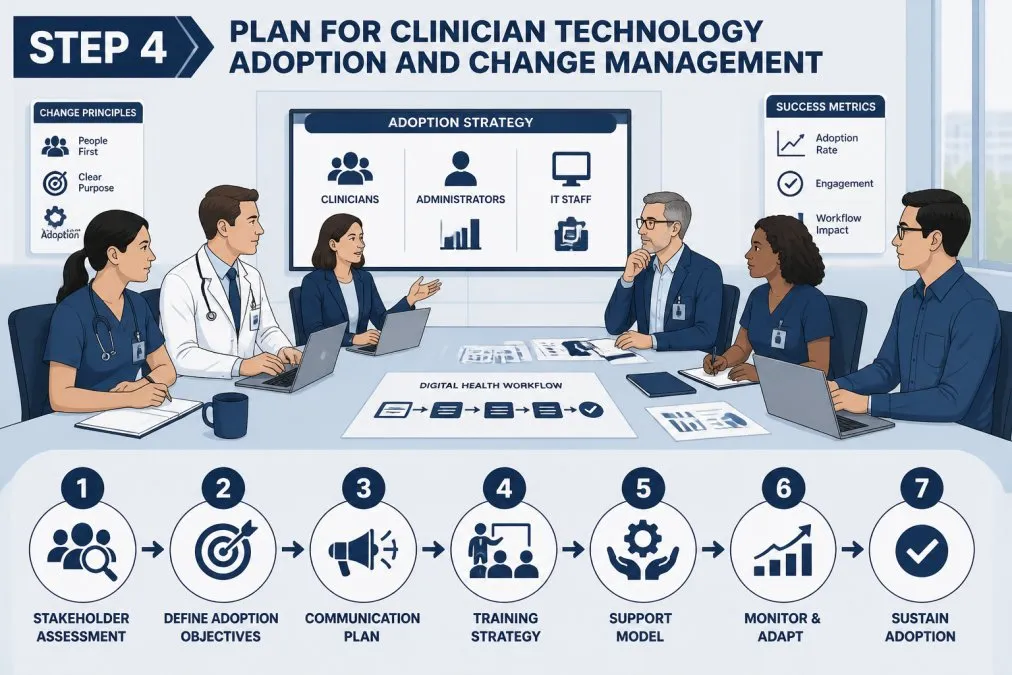
Infographic flowchart showing steps to integrate digital health hospital workflows through clinician meetings
Clinicians are skeptical of new technology for good reasons. They’ve seen tools promise efficiency but create more work.
Start by identifying clinical champions. How to Build Clinical Champion Networks That Scale shows how to build a team of clinicians who drive adoption from inside the organization.
Communication matters more than the tool itself. Explain why the change is happening. Show clinicians how the new workflow saves them time.
Expect resistance. Some clinicians will prefer the old way. Some will worry about patient safety. Some will fear job loss. These are real concerns.
Build in time for training. Don’t expect clinicians to learn on the job. Give them protected time to practice with the new system.
Create a rollout plan that doesn’t overwhelm one department. Start with early adopters. Let them work out the bugs.
Assign a dedicated support person for the first 30 days.
Why Clinicians Resist New Technology at Launch explains the psychology behind resistance. Understanding that resistance is predictable and manageable changes how you plan adoption.
How to Build Clinical Champion Networks That Scale shows how to build a team of clinicians who drive adoption from inside the organization.
Step 5: Execute Digital Health Implementation Best Practices
Digital health implementation best practices are the concrete steps that separate successful rollouts from failed ones.
Start small. Pick one unit or one workflow to go live first. You’ll learn what works and what doesn’t before rolling out hospital-wide. Mistakes in a pilot affect dozens of people.
Set a clear go-live date. Ambiguity kills momentum. Clinicians need to know when the change happens so they can prepare.
Before go-live, run parallel testing. Run the new workflow alongside the old one for a week or two. That way, if something breaks, you have a backup.
Have a rollback plan. If the new system causes patient safety issues or major workflow problems, you need a way to go back to the old system quickly.
Assign clear roles during implementation. Who handles technical issues? Who handles workflow questions? Who escalates patient safety concerns? When a problem happens, and it will, people need to know who to call.
Monitor the first week closely. Check in with clinicians every day. Ask what’s working and what’s not. Be prepared to adjust.
Here’s what to track during implementation:
- Clinician productivity (is it improving or declining?)
- Patient safety metrics (are errors increasing?)
- System downtime or technical issues
- Staff satisfaction and confidence
- Time to complete key workflows
Document everything. What worked? What didn’t? What would you do differently? That information is gold for your next implementation.
Step 6: Monitor Clinical Outcomes and Measure Adoption Success
You can’t improve what you don’t measure. After digital health goes live, you need metrics that show whether adoption is working.
Most hospitals measure the wrong things. They track system uptime or how many clinicians logged in.
Measure clinical outcomes instead. Did appointment no-show rates drop? Did medication errors decrease? Did patient wait times improve? Those metrics matter.
Measure adoption metrics too. How many clinicians are using the tool? How often? Are they using all the features or just a few?
Track workflow efficiency. How long does it take to complete key tasks now versus before? If documentation time didn’t improve, the tool isn’t working the way it should.
How to Measure Healthcare Customer Onboarding Success outlines the metrics that actually predict long-term adoption and clinical value.
Set up a feedback loop.
Create a dashboard that shows adoption and clinical outcomes in real time. Share it with leadership and clinical teams. Transparency builds accountability. It also shows clinicians that their feedback is being heard.
Don’t expect perfection immediately. Most tools take 90 days to reach steady state. Clinicians need time to build muscle memory. Workflows need refinement based on real-world use. That’s normal.
How to Accelerate Your Digital Health Integration Timeline
Most hospital digital health integrations take 12 to 18 months from planning to full adoption. That’s slow. Competitors are moving faster.
Acceleration isn’t about cutting corners. It’s about removing delays that don’t add value.
First, get stakeholder alignment before you start.
Second, run workstreams in parallel instead of sequentially. Don’t finish workflow mapping before starting vendor selection. Start both at the same time.
Third, set firm deadlines and enforce them. Scope creep is the biggest killer of timelines. Every new feature request delays launch.
Fourth, dedicate resources full-time. Part-time project managers get part-time results. Assign people whose sole job is digital health integration.
MedTech Market Readiness Assessment (Audit) That Drives Adoption helps you identify exactly which constraints are slowing you down.
Integrating digital health into hospital workflows is complex. It requires clinical insight, technical expertise, and organizational discipline.
The hospitals that succeed are the ones that start with clinician workflows, not technology. They map what’s broken. They involve clinicians in design.
If your hospital is ready to move beyond planning to execution, book a free intro meeting with Int’l Commercialization Growth Partners.
| Step | Focus | Timeline | Key Outcome |
|---|---|---|---|
| 1 | Assess current workflows and identify inefficiencies | 2-3 weeks | Baseline understanding of pain points |
| 2 | Map clinical workflows to pinpoint integration points | 3-4 weeks | Visual documentation of where tools fit |
| 3 | Design EHR integration with interoperability standards | 4-6 weeks | Technical architecture aligned with clinical needs |
| 4 | Plan clinician adoption and change management | 2-3 weeks | Clinical champion network and communication plan |
| 5 | Execute implementation with pilot approach | 6-8 weeks | Successful pilot launch with feedback loop |
| 6 | Monitor outcomes and measure adoption success | Ongoing | Real-time metrics on clinical and workflow impact |
Frequently Asked Questions
How do you assess a hospital workflow before implementing digital health?
Start by documenting current processes: map appointment scheduling, patient triage, clinical documentation, and medication management steps. Interview clinicians about pain points and time sinks. Measure baseline metrics like appointment-to-treatment time, manual data entry hours, and rework cycles. Identify bottlenecks where digital health can reduce manual tasks and improve care coordination. This assessment becomes your baseline to measure success after integration and guides where digital health tools will have the highest impact.
How can hospitals integrate digital health tools with an EHR?
Ensure the digital health platform meets HIPAA compliance and supports interoperability standards like HL7 and FHIR. Work with your EHR vendor and the digital health provider to establish secure data exchange protocols. Test integration in a pilot unit first, validating that patient data flows correctly and clinicians can access information without duplicating work. Plan for staff training on the new workflow and allow time for troubleshooting before full rollout. Integration success depends on clear governance and accountability for both systems.
How do you get clinicians to adopt new digital health technology?
Clinician engagement starts before implementation: involve them in workflow design and address their specific concerns about time burden and usability. Provide hands-on training and assign champions within each unit who can model the new workflow and answer peer questions. Show early wins, reduced documentation time, faster patient access to results, to build confidence. Acknowledge that adoption takes time; expect 60-90 days for comfort with new processes. Ongoing support and feedback loops signal that you’re listening to their experience, not just rolling out a mandate.
How should hospitals measure the success of a digital health implementation?
Track both operational and clinical metrics: appointment-to-treatment time, clinician time spent on documentation, medication error rates, patient engagement (virtual visit completion, patient portal adoption), and care coordination timeliness. Compare baseline measurements taken before integration to post-launch data at 30, 60, and 90 days. Monitor staff efficiency gains and patient outcomes. Set clear success thresholds upfront, for example, a 20% reduction in manual documentation hours, so leadership and clinicians understand what success looks like and can celebrate progress together.
 Add medicalsalesgrowth.com as a preferred source on Google →
Written by Craig T. Ingram, Co-founder · Chief Commercialization & Strategy Advisor.
Keep reading